

- Building multi-agent systems
- Re-using a set of nodes in multiple graphs
- Distributing development: when you want different teams to work on different parts of the graph independently, you can define each part as a subgraph, and as long as the subgraph interface (the input and output schemas) is respected, the parent graph can be built without knowing any details of the subgraph
Setup
Define subgraph communication
When adding subgraphs, you need to define how the parent graph and the subgraph communicate:Call a subgraph inside a node
When the parent graph and subgraph have different state schemas (no shared keys), invoke the subgraph inside a node function. This is common when you want to keep a private message history for each agent in a multi-agent system. The node function transforms the parent state to the subgraph state before invoking the subgraph, and transforms the results back to the parent state before returning.Full example: different state schemas
Full example: different state schemas
Full example: different state schemas (two levels of subgraphs)
Full example: different state schemas (two levels of subgraphs)
This is an example with two levels of subgraphs: parent -> child -> grandchild.
Add a subgraph as a node
When the parent graph and subgraph share state keys, you can pass a compiled subgraph directly toadd_node. No wrapper function is needed — the subgraph reads from and writes to the parent’s state channels automatically. For example, in multi-agent systems, the agents often communicate over a shared messages key.
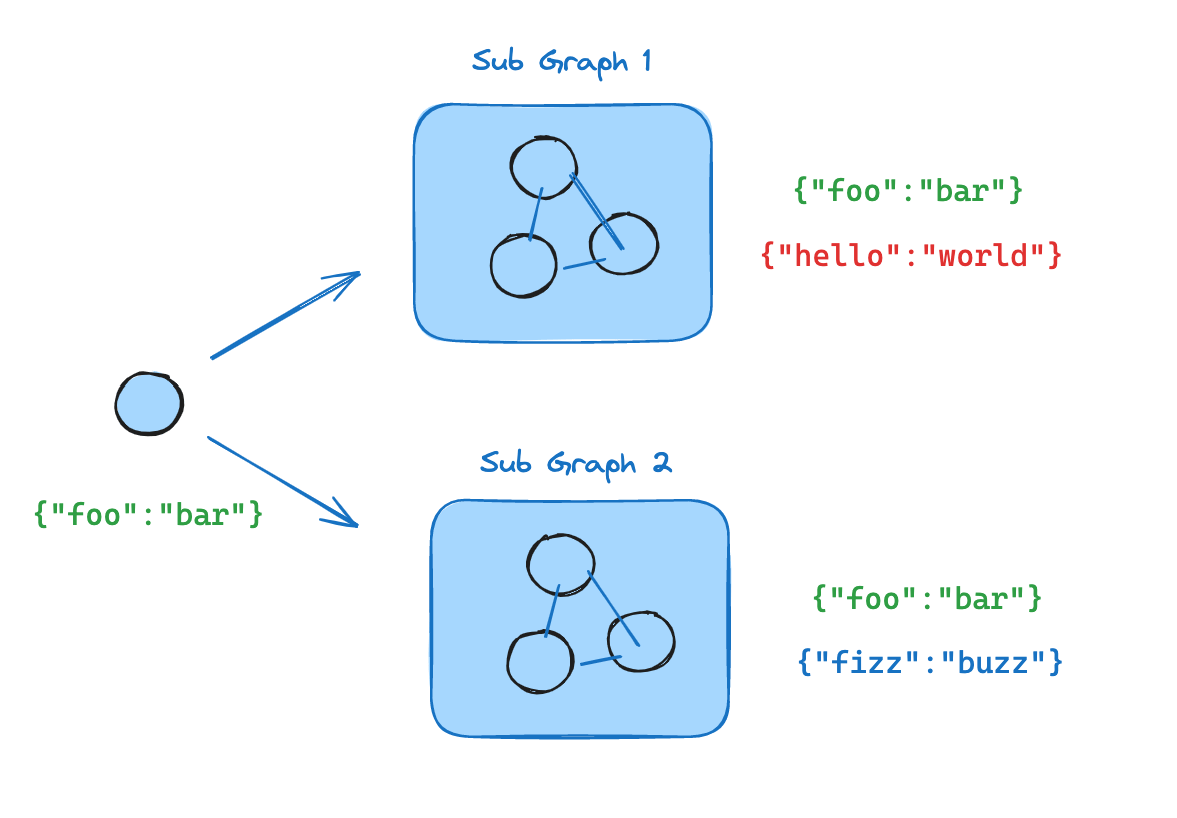
- Define the subgraph workflow (
subgraph_builderin the example below) and compile it - Pass compiled subgraph to the
add_nodemethod when defining the parent graph workflow
Subgraph persistence
When you use a subgraph, you need to decide what happens to its internal data between calls. Consider a customer support bot that delegates to specialist subagents: should the “billing expert” subagent remember the customer’s earlier questions, or start fresh each time it’s called? By default, subgraphs are stateless (no memory): each call starts with a blank slate. This is the right choice for most applications, including multi-agent systems where subagents handle independent requests. If a subagent needs multi-turn conversation memory (for example, a research assistant that builds context over several exchanges) you can make it stateful (persistent memory) so its conversation history and data accumulate across calls on the same thread.The parent graph must be compiled with a checkpointer for subgraph persistence features (interrupts, state inspection, stateful memory) to work. See persistence.
Stateless
Use stateless subgraphs when each call to the subgraph is independent and the subagent doesn’t need to remember anything from previous calls. This is the most common pattern, especially for multi-agent systems where subagents handle one-off requests like “look up this customer’s order” or “summarize this document.” There are two stateless options depending on whether you need interrupts (human-in-the-loop pausing) and durable execution within the subgraph.With interrupts
Use this when you want a subagent with no memory across calls, but you still need durable execution and the ability to pause mid-run for user input (for example, asking for approval before taking an action). This is the default behavior: omitcheckpointer or set it to None. Each call starts fresh, but within a single call, the subgraph can use interrupt() to pause and resume.
The following examples use two subagents (fruit expert, veggie expert) wrapped as tools for an outer agent:
- Interrupts
- Multi-turn
- Multiple subgraph calls
Each invocation can use
interrupt() to pause and resume. Add interrupt() to a tool function to require user approval before proceeding:Without interrupts
Use this when you want to run a subagent like a normal function call with no checkpointing overhead. The subgraph cannot pause/resume and does not benefit from durable execution. Compile withcheckpointer=False.
Stateful
Use stateful subgraphs when a subagent needs to remember previous interactions. For example, a research assistant that builds up context over several exchanges, or a coding assistant that tracks what files it has already edited. With stateful persistence, the subagent’s conversation history and data accumulate across calls on the same thread. Each call picks up where the last one left off. Compile withcheckpointer=True to enable this behavior.
The following examples use a single fruit expert subagent compiled with checkpointer=True:
- Interrupts
- Multi-turn
- Multiple subgraph calls
Stateful subagents support
interrupt() just like per-invocation. Add interrupt() to a tool function to require user approval:Prevent parallel calls to stateful subgraphs
Prevent parallel calls to stateful subgraphs
When an LLM has access to a stateful subagent as a tool, it may try to call that tool multiple times in parallel (for example, asking the fruit expert about apples and bananas simultaneously). This causes checkpoint conflicts because both calls write to the same namespace.Use If the LLM tries to call
ToolCallLimitMiddleware to cap how many times a tool can be called per agent run. If the LLM tries to call the tool more than the limit, the extra calls return an error message instead of executing:ask_fruit_expert twice in one run (for example, once for apples and once for bananas), only the first call executes. The second returns "Tool call limit exceeded. Do not call 'ask_fruit_expert' again." and the LLM can retry in a follow-up turn.Run multiple different stateful subagents in parallel
Run multiple different stateful subagents in parallel
When you have multiple different stateful subagents (for example, a fruit expert and a veggie expert), each one needs its own storage space so their checkpoints don’t overwrite each other. This is called namespace isolation.If you call subgraphs inside a node, LangGraph assigns namespaces based on call order (first call, second call, etc.). This means reordering your calls can mix up which subagent loads which data. To avoid this, wrap each subagent in its own Subgraphs added as nodes already get name-based namespaces automatically, so they don’t need this wrapper.
StateGraph with a unique node name. This gives each subagent a stable, name-based namespace:Checkpointer reference
Control subgraph persistence with thecheckpointer parameter on .compile():
- Interrupts (HITL): The subgraph can use interrupt() to pause execution and wait for user input, then resume where it left off.
- Multi-turn memory: The subgraph retains its state across multiple invocations within the same thread. Each call picks up where the last one left off rather than starting fresh.
- Multiple calls (different subgraphs): Multiple different subgraph instances can be invoked within a single node without checkpoint namespace conflicts.
- Multiple calls (same subgraph): The same subgraph instance can be invoked multiple times within a single node. With stateful persistence, these calls write to the same checkpoint namespace and conflict — use per-invocation persistence instead.
- State inspection: The subgraph’s state is available via
get_state(config, subgraphs=True)for debugging and monitoring.
View subgraph state
When you enable persistence, you can inspect the subgraph state using the subgraphs option. Withcheckpointer=False, no subgraph checkpoints are saved, so subgraph state is not available.
Viewing subgraph state requires that LangGraph can statically discover the subgraph — i.e., it is added as a node or called inside a node. It does not work when a subgraph is called inside a tool function or other indirection (e.g., the subagents pattern). Interrupts still propagate to the top-level graph regardless of nesting.
- Stateless
- Stateful
Returns subgraph state for the current invocation only. Each invocation starts fresh.
Stream subgraph outputs
To include outputs from subgraphs in the streamed outputs, you can set the subgraphs option in the stream method of the parent graph. This will stream outputs from both the parent graph and any subgraphs.Stream from subgraphs
Stream from subgraphs
Connect these docs to Claude, VSCode, and more via MCP for real-time answers.